









Size to input on products
One of the most common questions we receive is whether the Width × Height fields on our product pages should match the artboard (canvas) size or the actual artwork size.
The answer depends on the type of product you’re ordering.
If you are unable to figure out these sizes, you can place your order with the approximate sizes needed, and we will scale your design proportionally to the larger side dimension ordered. You will see the final cut sizes in the proofs sent for approval before production.
Custom Shape Stickers
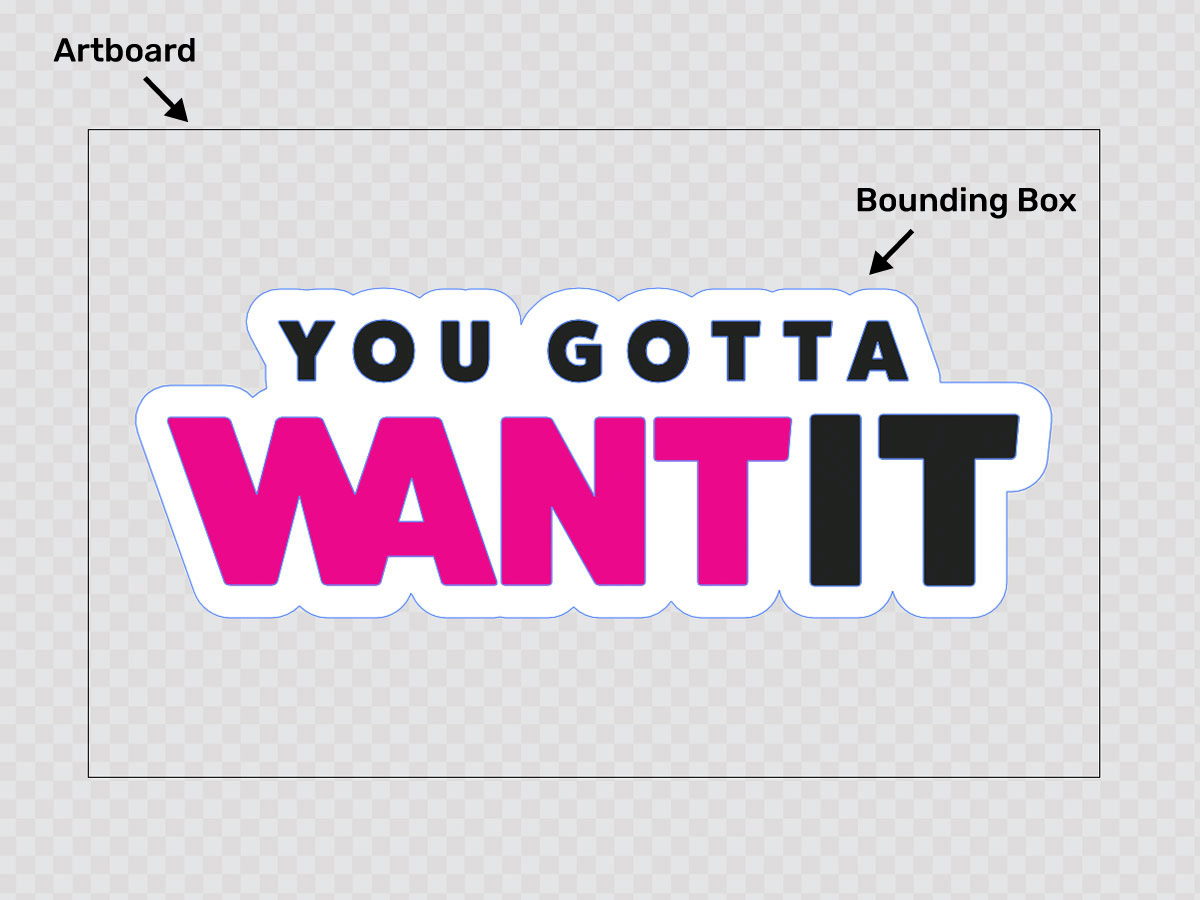
For Custom Shape Stickers, the dimensions you enter should match the actual artwork size—also known as the bounding box of the design.
For example:
- If you select all of the artwork and it measures 5″ × 3″, enter 5″ × 3″ on the product page.
- The artboard itself can be any size, although we recommend cropping it reasonably close to the artwork to avoid confusion during proofing.
The cut line is generated around the artwork itself, so the artboard dimensions are not used for production.
Example
- Artwork (bounding box): 5″ × 3″
- Artboard: 8″ × 8″
Enter: 5″ × 3″
Transfer Stickers (Cut Lettering)
Transfer stickers are a little different because some customers use the liner paper as an installation guide.
There are two common ways to size transfer stickers:
Option 1 – Enter the Artboard Size (Recommended for Positioning)
If you’ve already laid out your lettering exactly how it should be installed, with the artboard representing the installation area, enter the artboard dimensions.
For example:
- Artboard: 24″ × 12″
- Lettering only occupies 20″ × 8″
If you want the transfer tape and liner paper to remain 24″ × 12″ for easier positioning during installation, enter:
24″ × 12″
This is a popular method for wall lettering, vehicle graphics, and decals that need to align within a specific area.
Option 2 – Enter the Artwork Size
If you would rather have the liner paper trimmed closely around the vinyl, enter the bounding box dimensions of the artwork instead.
For example:
- Artwork measures 20″ × 8″
- Artboard measures 24″ × 12″
If you want the liner trimmed close to the design, enter:
20″ × 8″
You can also simply enter the final dimensions you’d like the artwork to be, and we’ll scale it proportionally for you (unless otherwise instructed).
Quick Reference
Custom Shape Stickers
- Enter the bounding box (actual artwork size).
- Artboard size does not matter for production.
- We recommend cropping the artboard close to the artwork.
Transfer Stickers
- Enter the artboard size if you’re using the liner paper as an installation guide.
- Enter the bounding box size if you want the liner trimmed closely around the design.
- Or enter the final size you’d like the artwork scaled to, and we’ll size it proportionally.
Don't worry! If you're unsure which dimensions to enter, upload your artwork and leave a note with your order. Our prepress team will review the file and contact you if anything needs clarification before production.
If the dimensions shown on your proof don’t match the size you intended to order, don’t worry! In many cases, this is due to the proportions of the uploaded artwork compared to the dimensions entered during checkout.
We’ve put together a guide that explains exactly how we size graphics based on the dimensions entered on your order, including how aspect ratios affect the final size.