









How to Reorder a Previous Order
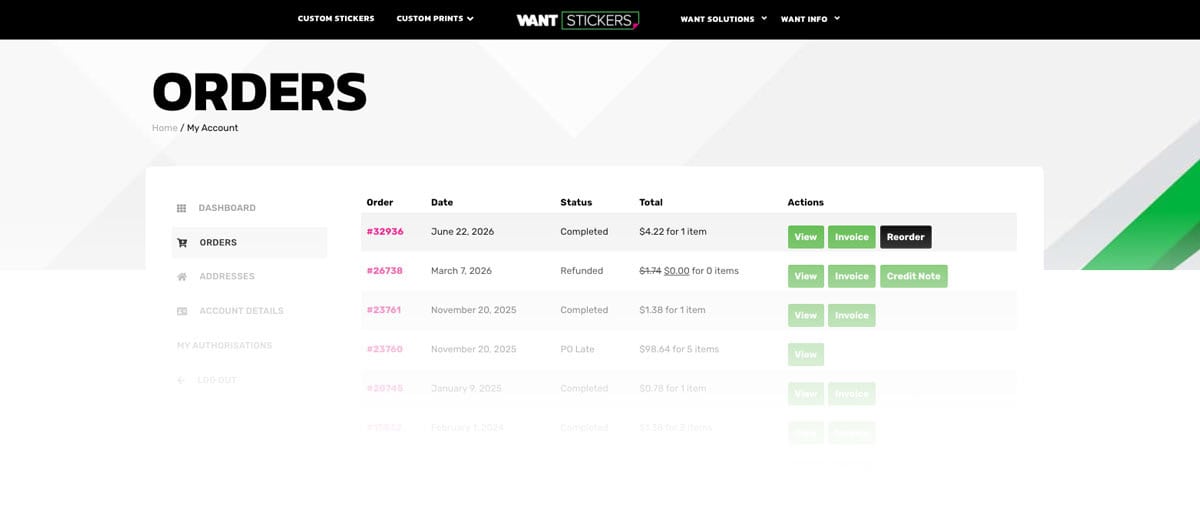
- Log in to your Want Stickers account.
- Navigate to My Account → Orders.
- Find an eligible order and click Reorder.
- Your previous items will be added to your shopping cart, ready for checkout.
Note: Online reordering is available for eligible orders placed on or after June 22, 2026. If you need to reorder an older order, please contact our support team, and we’ll be happy to recreate your order.
What Happens When You Reorder?
A reorder creates a brand new order using your previous selections. It does not modify your original order.
Once the items are added to your cart, you can:
- Change the quantity of each item.
- Add new products to your cart.
- Remove products you no longer need.
- Update your billing and shipping information.
- Choose a different shipping method.
- Apply eligible coupon codes.
- Complete checkout just like any new order.
Will My Previous Price Be Used?
Not necessarily.
Your reordered items are priced using our current pricing at the time you place the new order. If pricing, materials, or product options have changed since your original purchase, your new order total may be different.
This ensures every reorder uses the latest available products, materials, and pricing.
Can I Change the Design, Size, or Material?
The Reorder feature is designed to quickly recreate your previous order using the same specifications.
If you need to change the:
- Artwork
- Size
- Material
- Laminate
- Cut type
- Other product options
Simply place a new order using the product page, or contact our support team, and we’ll be happy to help.
Ask us about our Fast Fulfillment Portal, a private area of our website built exclusively for your business. When you and your team are logged in, you'll have one-click access to your most frequently ordered products—no need to re-enter sizes, upload artwork, or recreate previous orders.
FAQ
Yes. After clicking Reorder, you can continue shopping and add any additional products to your cart before checking out.
No. Your original order remains unchanged. A reorder simply creates a new shopping cart based on your previous order.
Prices may change over time due to material updates, product improvements, or pricing adjustments. Your reorder always uses the current pricing available at checkout.
No. You must be signed in to the account used to place the original order in order to access your order history and eligible reorders.
No problem! If your company needs access to previous orders but the original account owner is no longer available, contact our support team. We’ll create a new user account (or update an existing one) and transfer your company’s eligible order history to the new account whenever possible. Once completed, you’ll be able to access those orders and use the Reorder feature just like the original account holder.
Please note: For security purposes, we may verify company ownership or request additional information before transferring order history between accounts.
2 Responses
Good Evening This is Rosevelt Robinson with Robinson Haulers LLC. I would like to reorder my last order again thanks!
Thank you for reaching out! We’ll be happy to assist with your reorder. We’ll send you an email shortly with a link to place your reorder easily.
Thanks again for choosing us!